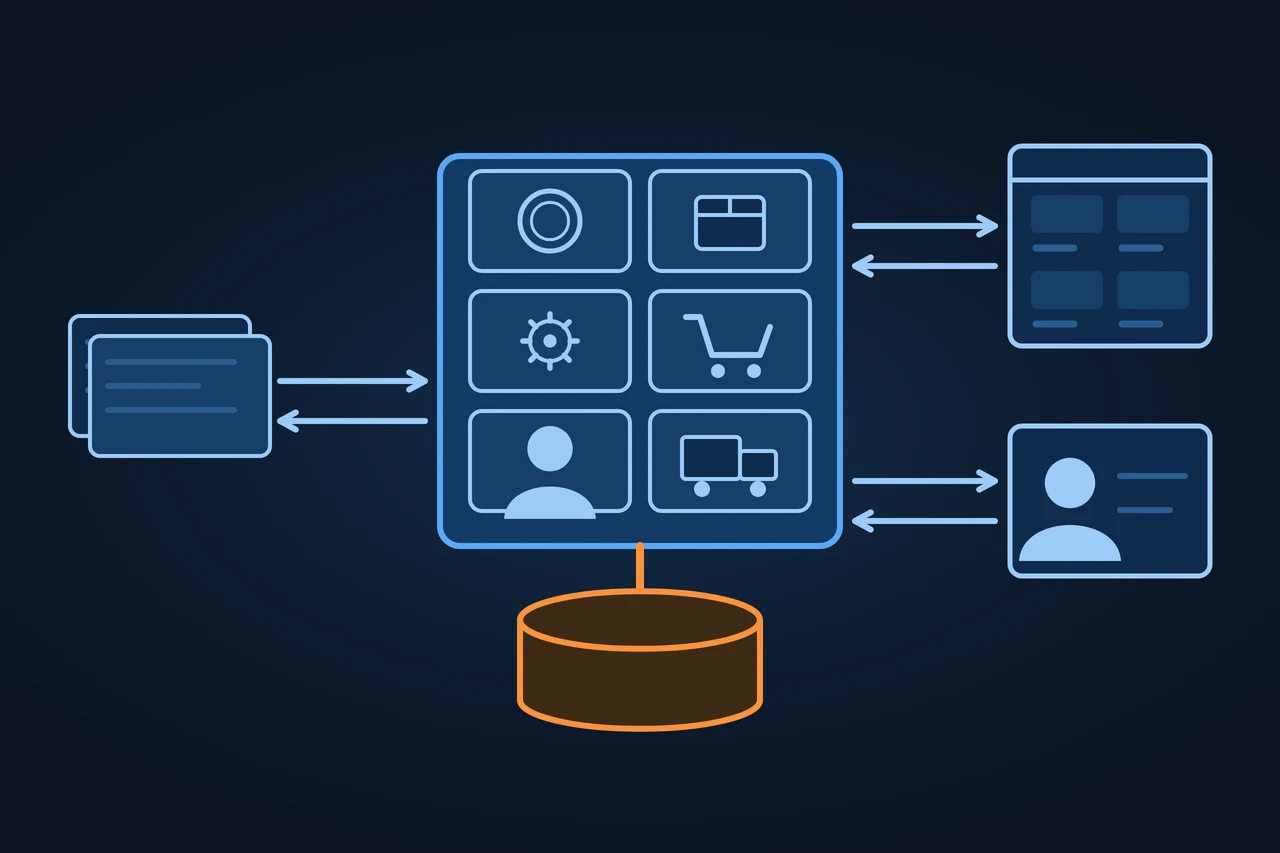
ERP, short for enterprise resource planning, is business software that runs finance, purchasing, inventory, production, sales and HR in one system. The modules share a common database, so an order entered by sales updates stock levels and the accounts without anyone keying it in twice. Companies install ERP on their own servers or rent it from a vendor in the cloud.
What ERP means, where the term came from, which modules it covers, how it is deployed and how it connects to PIM, the online store, CRM and EDI.
Origin of the term
Oracle writes that by 1990 technology analysts had a name for the new category of business software that had spread from the factory into finance, HR and customer data: enterprise resource planning. Microsoft places the term in the 1990s. Its predecessors were MRP (material requirements planning) and MRP II (manufacturing resource planning).
The same three letters mean other things. In mental health, ERP is exposure and response prevention, a form of cognitive behavioural therapy that the NHS lists as the usual therapy for obsessive compulsive disorder. In the BIOS of some motherboards, "ErP Ready" is a standby power setting; ASUS explains it as Europe's energy efficiency requirements for energy-related products.
History and development
1964: Black and Decker becomes the first company to adopt material requirements planning, run on a mainframe computer, according to Oracle.
1983: MRP II arrives. Its "modules" bring purchasing, bills of materials, scheduling and contract management into one system.
Around 1990: the systems add finance, CRM and HR, and analysts start calling them ERP.
1990s to early 2000s: adoption grows quickly, Oracle says, while implementation costs climb. Hardware sits in company server rooms, and hardware and licences are written off over 5 to 10 years.
4 February 2020: SAP commits to mainstream maintenance for the core applications of SAP Business Suite 7, including SAP ERP 6.0, until the end of 2027, with optional extended maintenance until the end of 2030. For SAP S/4HANA it commits to maintenance until the end of 2040.
The cloud changed the upgrade cycle. In Oracle's description, a SaaS provider patches and updates the software several times a year, where an on-premises system needed an expensive upgrade every 5 to 10 years.
How it works
Everything rests on one data model. Oracle says an ERP system is designed around a single, defined data structure (schema) that typically shares a database, so every department works with the same definition of a customer, an item or an account. The modules sit on top: finance, purchasing, inventory, manufacturing, sales, projects and HR. Microsoft describes modern ERP as modular. A business starts with what it needs most and adds modules as it grows.
Microsoft walks through a sales order to show how the modules hand work to each other. A salesperson enters the order, and the system checks the customer's credit and the available stock. It reserves the stock and sends a pick-and-ship task to the warehouse. When the order ships, stock levels drop and the system creates an invoice. The invoice posts to accounts receivable and the general ledger, and the sale shows up in the financial reports.
Most ERP systems also connect to other applications, Microsoft says: CRM, ecommerce platforms, banking and payroll, through prebuilt connectors, an API or integration platforms. Microsoft's advice is to decide which system owns each type of data before connecting anything. Akeneo's API tutorial shows the link to a PIM. New products are created in the ERP every day. Each evening a connector reads the ERP's XML export, maps each ERP field to a PIM attribute and writes the products to the PIM through its REST API, where the team enriches them the next day. The Shopify Help Center lists what moves between Shopify B2B and Microsoft Dynamics 365 Business Central: orders, products, customers and payment status sync both ways, inventory and price lists go to the store, and refunds and cancellations, among others, come back.
Put together, the ERP holds the item number, stock, purchase and selling prices and the order. The PIM takes the product from the ERP and adds descriptions, images and attributes. The store gets content from the PIM and stock and price from the ERP, and sends orders back. The CRM keeps the contact and the sales opportunity. With large customers and suppliers, orders, delivery notes and invoices can travel from one ERP to the other by EDI, which EU Recommendation 94/820/EC defines as the electronic transfer, from computer to computer, of commercial and administrative data using an agreed standard.
Who holds which data
ERP
Holds
Item numberStockPurchase priceSelling priceOrder
PIM
From the ERPthe product
Addsdescriptions, images, attributes
Store
From the ERPstock and price
From the PIMthe content
To the ERPorders
CRM
Keepscontact, sales opportunity
Customer’s or supplier’s ERP
By EDIorders, delivery notes, invoices
Which data the ERP holds, and what each connected system receives or sends back
Types and variants
Deployment
Where it runs
Who maintains the software
Named by
On-premises
The company's own servers
The company
Oracle, SAP
Cloud (SaaS)
The vendor's servers, accessed over the internet
The vendor, for a subscription
Oracle, SAP, Microsoft
Hybrid
Partly on premises, partly in the cloud
Both
Oracle, SAP, Microsoft
Two-tier
Central ERP at headquarters, a second one at subsidiaries
Depends on the tier
SAP
Source: Oracle, "What Is ERP?"; SAP, "What is ERP? The Essential Guide" (archived 11.02.2026); Microsoft, "What Is ERP?", accessed 19.11.2026.
Cloud ERP is a form of SaaS. SAP's two-tier example is a parent company running ERP on premises at headquarters while a subsidiary uses a cloud system, a setup it links to mergers, expansions and acquisitions.
ERP systems also differ by who they are built for. Oracle describes industry-specific ERP with features such as materials planning or specialised manufacturing records, so companies need less customisation and fewer outside tools. For small businesses, Microsoft points to all-in-one systems that connect accounting, sales, purchasing and inventory.
Examples
In alphabetical order, in each vendor's own description:
Holded: presents itself as "a new type of ERP" in the cloud, aimed at small businesses and entrepreneurs.
Microsoft Dynamics 365 Business Central: designed for small and midsize businesses, according to Microsoft. It runs online, with data in Microsoft's cloud, or on premises.
Odoo: a suite of open source business apps covering CRM, ecommerce, accounting, inventory, point of sale and projects. Odoo Community is licensed under the LGPLv3, and Odoo Enterprise adds features. It runs as Odoo Online, on Odoo.sh or on the customer's own servers.
Oracle Fusion Cloud ERP: a cloud ERP that Oracle says is updated as often as monthly.
Sage X3: a cloud ERP for manufacturing and distribution, according to Sage.
SAP: SAP S/4HANA and its predecessor SAP ERP 6.0, from SAP SE, based in Walldorf, Germany.
How to measure it
Microsoft recommends setting goals and KPIs before choosing a system, for instance efficiency, visibility or growth, and tracking progress against them after go-live. Total cost has no single figure, so the table lists the cost types without amounts.
Cost item
Type
Note
Licence or subscription
One-off or recurring
Licence on premises, subscription in the cloud
Implementation
One-off
Process setup by an internal team or a partner
Data migration
One-off
Microsoft: data clean and complete before migration
Customisation
One-off and recurring
Every customisation has to survive each upgrade
Training
One-off and recurring
Before go-live and with each change
Operations
Recurring
Servers and support on premises, a fee in the cloud
Source: Oracle, "What Is ERP?"; Microsoft, "What Is ERP?", accessed 19.11.2026.
Advantages and disadvantages
The advantage Microsoft and Oracle name is a single set of data. A transaction entered in one area updates the rest of the business, in Microsoft's words, and Oracle adds that information stays normalised, with the same definitions across the company.
Oracle also describes the costs. On premises, hardware and software licences were capital investments, and organisations nearly always wanted to customise their ERP, which meant paying for consultants and training on top. An on-premises system also needs a large upgrade every 5 to 10 years. The cloud removes that jump, but the customer then follows the vendor's release schedule.
Source: Microsoft, "What Is ERP?"; Akeneo, "What is a PIM?"; Shopify Help Center, accessed 19.11.2026.
When a business needs a PIM as well as an ERP is covered in the PIM entry.
ERP and CRM get mixed up because both store customers. Microsoft draws the line this way: ERP runs the operational and financial processes of the business, while CRM handles customer relationships, sales, marketing and service. The CRM knows which quote went out and who opened it. The ERP knows whether the goods are in stock, what price they sold at and whether the invoice has been paid. According to Microsoft, many organisations connect the two so customer, order, inventory, billing and service data work together. Oracle also counts CRM among the front-office applications that ERP integrates with.
SAP is not a kind of system. It is a vendor, SAP SE, whose ERP products are SAP ERP 6.0 and SAP S/4HANA. An ERP can come from SAP or from any other vendor.
Criticism and limits
Oracle writes that organisations have always struggled to balance the high cost and complexity of traditional ERP against the need for customised features.
Microsoft lists what drives the length of an implementation: business complexity, data readiness, integrations, customisation and the rollout approach. It recommends a phased rollout that starts with the areas of highest impact.
Product life cycles are another limit. Once a vendor sets an end of maintenance, as SAP did for SAP ERP 6.0 at the end of 2027, customers have to plan a migration even if their system still works.
Legal framework
The ERP is where invoices are issued and received, so e-invoicing rules apply to it directly. In Spain, Royal Decree 238/2026 sets out mandatory e-invoicing between businesses. The Spanish tax agency says the obligation starts on 6 October 2027 for businesses with turnover above €8 million and on 6 October 2028 for everyone else. In Germany, every domestic business has had to be able to receive e-invoices since 1 January 2025, according to the Federal Ministry of Finance. The EDI entry covers the accepted formats.
How to apply it, step by step
Map today's processes and mark where data or time gets lost.
Set measurable goals and KPIs before you look at vendors.
Choose the deployment: on premises, cloud, hybrid or two-tier.
Build a team with finance, purchasing, warehouse, sales and IT.
Decide which system owns which data: price and stock in the ERP, descriptions in the PIM, contacts in the CRM.
Plan the interfaces to the PIM and the online store and, if customers or suppliers use EDI, the messages you will exchange.
Clean the master data before migrating it.
Roll out in phases, train users and test with real orders.
Compare the results with the KPIs you set at the start.
Best practices
Use the ERP's standard processes wherever they fit and customise only what sets you apart.
Document every customisation so you can review it before each upgrade.
Give each type of master data an owner.
Test the store and PIM interfaces with real volumes.
Check the vendor's end-of-maintenance dates before you sign.
Common mistakes
Picking a system by brand instead of by process.
Migrating messy master data.
Letting product names or prices be edited in both the ERP and the PIM.
Customising the ERP until every upgrade becomes a project.
Treating ERP as a synonym for SAP or for CRM.
How this entry was made
This entry was written in November 2026 with the help of AI. The facts come from the websites of Oracle, Microsoft, SAP, Akeneo, Shopify, Odoo, Sage and Holded, the Internet Archive, the Spanish Official State Gazette (BOE), the Spanish tax agency and the German Federal Ministry of Finance, accessed on 19.11.2026. It was reviewed before publication and contains no client data.
Manuel Riveiro RodriguezCEO & Digital Strategist
A technical audit covers this and everything else in one pass.
ERP stands for enterprise resource planning. It is business software that runs finance, purchasing, inventory, production, sales and HR on a common database. Oracle dates the term to around 1990.
Is ERP the same as SAP?
No. ERP is a type of software, and SAP is a German software company. Its ERP products are SAP ERP 6.0 and SAP S/4HANA. Other vendors include Microsoft, Odoo, Oracle and Sage.
What is the difference between ERP and CRM?
According to Microsoft, ERP runs the operational and financial processes, and CRM handles customer relationships, sales, marketing and service. The CRM tracks quotes and contacts, the ERP tracks stock, orders and invoices. Many organisations connect the two.
What types of ERP are there?
By deployment, SAP names four types: cloud, on premises, two-tier and hybrid. By audience, there are industry-specific ERP systems and all-in-one systems for small businesses.
What are examples of ERP systems?
In alphabetical order: Holded, Microsoft Dynamics 365 Business Central, Odoo, Oracle Fusion Cloud ERP, Sage X3 and SAP S/4HANA. The list is not a ranking.